Product Location (PLAI)
Optional
Needed if your app scans products or looks up product locations.
Introduction
Product Location AI (PLAI) provides retailers with store maps that include automatic product location updates. Leveraging AI, barcode scans and hardware-free indoor positioning, PLAI seamlessly creates and maintains products' locations, offering a practical way to use realograms.
- Oriient's software-only indoor positioning works transparently as an SDK in the background of the scanning app, keeping track of the device's precise in-store location.
- Each barcode scan is captured together with an accurate location tag from Oriient.
- PLAI uses an AI engine to automatically learn product locations based on where they were scanned, removing outliers and concluding the most probable placement(s).
- Use the SDK API to get a product's or a product category's location based on previously collected scans.
- Optional. A full PLAI
.csvreport is generated on a daily basis, providing the most up-to-date product location information based on the scans collected.
A "scan" is any action in the app of marking or checking off a product, taking place when the user is expected to be near the shelf.
Application Flow
Once the user is in the store, calibration is finished, and the user is positioned, product scan data can be sent to the SDK. Based on previously sent scans, it is possible to receive a product's or a product category's location.
The basic flow for implementing this feature:
1. Send a product scan
Use IPSPositioning.sendEventTag():
tag: the product ID (a unified identifier used to identify the product, such as an EAN or similar);metadata: optional information about the product; the product's categories can be provided via this parameter as JSON:lx_category: category name at levelx;lx_category_id: category ID at levelx;x: ranges from 1 to 6;
type:.productScan, identifying a "product scan" event.
let jsonEncoder = JSONEncoder()
let metadata = ProductMetadata(
    productCategory: ProductCategory(
        l1Category: "Food",
        l1CategoryId: "food_id",
        l2Category: "Pantry",
        l2CategoryId: "pantry_id",
        l3Category: "Soups",
        l3CategoryId: "soups_id",
        l4Category: "Broths & Stocks",
        l4CategoryId: "broths_and_stocks_id",
        l5Category: "Meat Broths & Stocks",
        l5CategoryId: "meat_broths_and_stocks_id",
        l6Category: "Beef Broths & Stocks",
        l6CategoryId: "beef_broths_and_stocks_id"
    )
)
let metadataJson = String.init(data: (try? jsonEncoder.encode(metadata)) ?? Data(), encoding: .utf8)

// This code should be called for each barcode scan
IPSPositioning.sendEventTag(
    tag: "[Product ID]",
    metadata: metadataJson,
    type: .productScan,
    onSuccess: {
        // The event is registered, the SDK will take care of saving it
    },
    onError: { error in
        // The SDK has failed to register the event
        // Can happen if Login is not done or Positioning is not active
        // Never retry after a failure
    }
)

// Metadata model definition
struct ProductMetadata: Codable {
    let productCategory: ProductCategory

    enum CodingKeys: String, CodingKey {
        case productCategory = "product_category"
    }
}

struct ProductCategory: Codable {
    let l1Category: String?
    let l1CategoryId: String?

    let l2Category: String?
    let l2CategoryId: String?

    let l3Category: String?
    let l3CategoryId: String?

    let l4Category: String?
    let l4CategoryId: String?

    let l5Category: String?
    let l5CategoryId: String?

    let l6Category: String?
    let l6CategoryId: String?

    enum CodingKeys: String, CodingKey {
        case l1Category = "l1_category"
        case l1CategoryId = "l1_category_id"

        case l2Category = "l2_category"
        case l2CategoryId = "l2_category_id"

        case l3Category = "l3_category"
        case l3CategoryId = "l3_category_id"

        case l4Category = "l4_category"
        case l4CategoryId = "l4_category_id"

        case l5Category = "l5_category"
        case l5CategoryId = "l5_category_id"

        case l6Category = "l6_category"
        case l6CategoryId = "l6_category_id"
    }
}
Sending a tag may fail if there is no stable Internet connection or no active positioning session. Never retry after a failure.
One-Time (High-Confidence) Scanning
Instead of waiting for multiple productScan events to be aggregated by the daily PLAI process, a single scan can be saved as the product's location immediately. Use the same IPSPositioning.sendEventTag() call with type: .highConfidenceProductScan:
IPSPositioning.sendEventTag(
    tag: "[Product ID]",
    metadata: metadataJson,
    type: .highConfidenceProductScan,
    onSuccess: {
        // The location is saved right away and is available immediately (see step 2)
    },
    onError: { error in
        // error.code == .invalidState if the position isn't locked or accurate enough
    }
)
This requires an active positioning session with a locked, high-accuracy position — if the requirement isn't met, the call fails with an IPSErrorCodes.invalidState error instead of being saved. Unlike a regular productScan, a highConfidenceProductScan doesn't go through the daily PLAI aggregation — the product's location is updated right away and is available immediately via step 2.
2. Get the product or product category location
The possible results of this step vary and depend on the number of products or category locations known to the SDK. For example, there could be a single product plus three known categories: l1_category spanning three rows of shelves, l2_category a row of shelves, and l3_category part of a row.
Product and category locations are provided per building. For multi-floor buildings, the location should be filtered based on floorId.
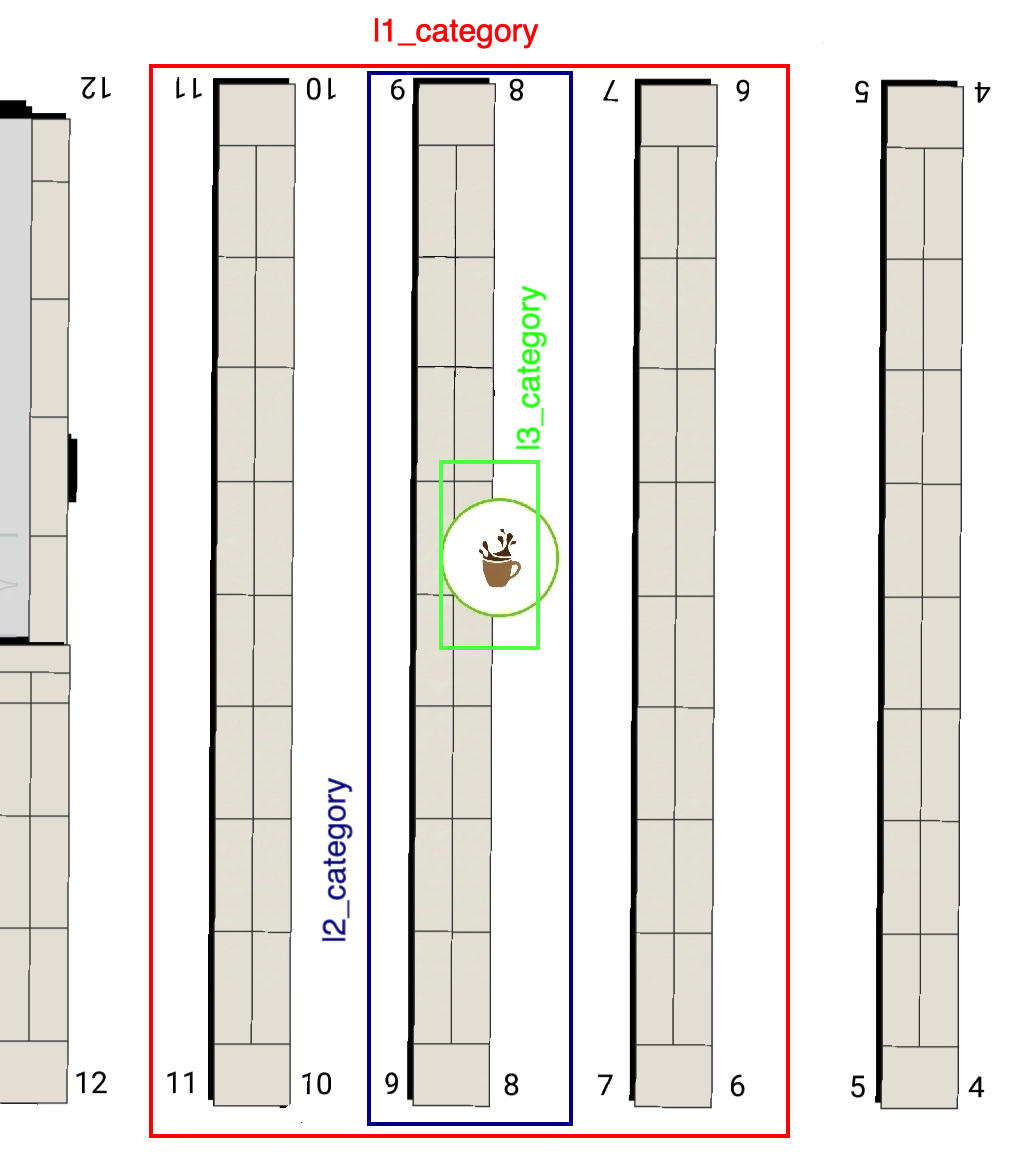
In most cases, use the combined API call that provides both product and/or product category locations (section a). In some specific cases, you may need to retrieve only the category location (section b) or only the product location (section c).
a) Get a product and/or its categories' location
Use IPSContent.getProductAndCategoriesLocation() with the product ID and the list of its category IDs — these should be the same IDs used to fill the tag (for the product) and metadata (for categories) parameters of sendEventTag():
productId: the identifier of the product to get the location for;buildingId: the identifier of the building the product location is provided for;categoryIds: the list of categories for the product in search.
func searchProductAndCategory(_ productId: String, _ categoryIds: [String]) {
    IPSContent.getProductAndCategoriesLocation(productId: productId, categoryIds: categoryIds, buildingId: self.building.id) { [weak self] searchResult in
        guard let result = searchResult else { return }
        if (result.productLocationSearchResult != nil) {
            // A product was found on the current floor
        } else {
            // Only categories were found
        }
    } onError: { error in
    }
}
If a product or its categories' locations are found, IPSProductAndCategoriesLocationSearchResult is returned; otherwise nil is returned:
buildingId: the identifier of the building the product location is provided for;productLocationSearchResult: if the product's location is found, IPSProductLocationSearchResult is returned; otherwisenil:buildingId,floorId,productId;primaryLocation: the location identified with the most confidence (IPSProductLocation) —x,y,regionIds,regionNames;allLocations: all available product locations associated with the result.
categoryLocationSearchResults: if the categories' locations are found, a list of IPSCategoryLocationSearchResult is returned, sorted from the smallest to the largest in terms of map area occupied; otherwise an empty list:buildingId,categoryId;primaryLocation: the category location identified with the most confidence (IPSCategoryLocation) —floorId,categoryName,bottomLeft,topRight;allLocations: all possible locations for this category.
recommendedNavigationDestination: the recommended navigation destination (IPSRecommendedProductNavigationDestination) — the product's location if the product was found, otherwise the location of the smallest matched category.
For a single-floor building, use primaryLocation on either result to identify the product or category location. For a multi-floor building, use allLocations and filter it by floorId to match the visible floor in the building.
b) Get a category's location
Use IPSContent.getCategoryLocation() with the category ID — should be the same ID used to fill the metadata parameter of sendEventTag():
categoryId: the identifier of the category to get the location for.
func searchCategory(_ categoryId: String) {
    IPSContent.getCategoryLocation(categoryId: categoryId, buildingId: self.building.id) { [weak self] searchResult in
        guard let result = searchResult?.primaryLocation else { return }
    }
    onError: { error in
    }
}
If the category's location is found, IPSCategoryLocationSearchResult is returned as described above; otherwise nil is returned.
c) Get a product's location
Use IPSContent.getProductLocation() with the product ID — should be the same ID used to fill the tag parameter of sendEventTag():
productId: the identifier of the product to get the location for;buildingId: the identifier of the building the product location is provided for.
func searchProduct(_ productId: String, buildingId: String, currentFloorId: String) {
    IPSContent.getProductLocation(productId: productId, buildingId: buildingId) { resultInfo in
        guard let location = resultInfo?.primaryLocation else { return }
        if location.floorId == currentFloorId {
            // Place the product on the map at (location.x, location.y)
        }
    } onError: { error in
    }
}
If the product's location is found, IPSProductLocationSearchResult is returned as described above; otherwise nil is returned.