Calibration
Required
Needed by every integration.
Overview
The IPSFramework determines the user's position by using readings from a range of device sensors, including the gyroscope, accelerometer, and magnetometer, among others. To uphold high accuracy, the framework may intermittently request the user to calibrate their device's integrated hardware. It falls upon the application developer to manage these calibration-related events initiated by the IPSFramework.
The calibration process is driven by the IPSFramework via a procedure known as 'automatic calibration'. This approach requires the device to be moved around the axis for successful calibration, as depicted in the image below. This movement facilitates the calibration, enabling it to eventually reach a state of 100% convergence quickly.
Background calibration
Calibration can be initiated in the background, eliminating the need for any user interface interaction. Progress will be made as long as device movement is detected. Hence, even when the device is in the user's hand or pocket while moving around, the calibration is likely to progress.
Foreground calibration
Upon invoking the start positioning command, the IPSFramework may proactively alert the app when calibration is required through the IPSPositioningObserver.onCalibrationGestureNeeded(). Whenever this method is called, it is recommended to present a calibration UI to offer guidance and feedback to the users. The customizable calibration dialog is no longer part of the SDK: since SDK 9.0.0 it is available in the Oriient sample app, which you can use as a starting point for your own calibration UI. The most effective way to complete the calibration process involves making rotational movements with the device, as illustrated below.
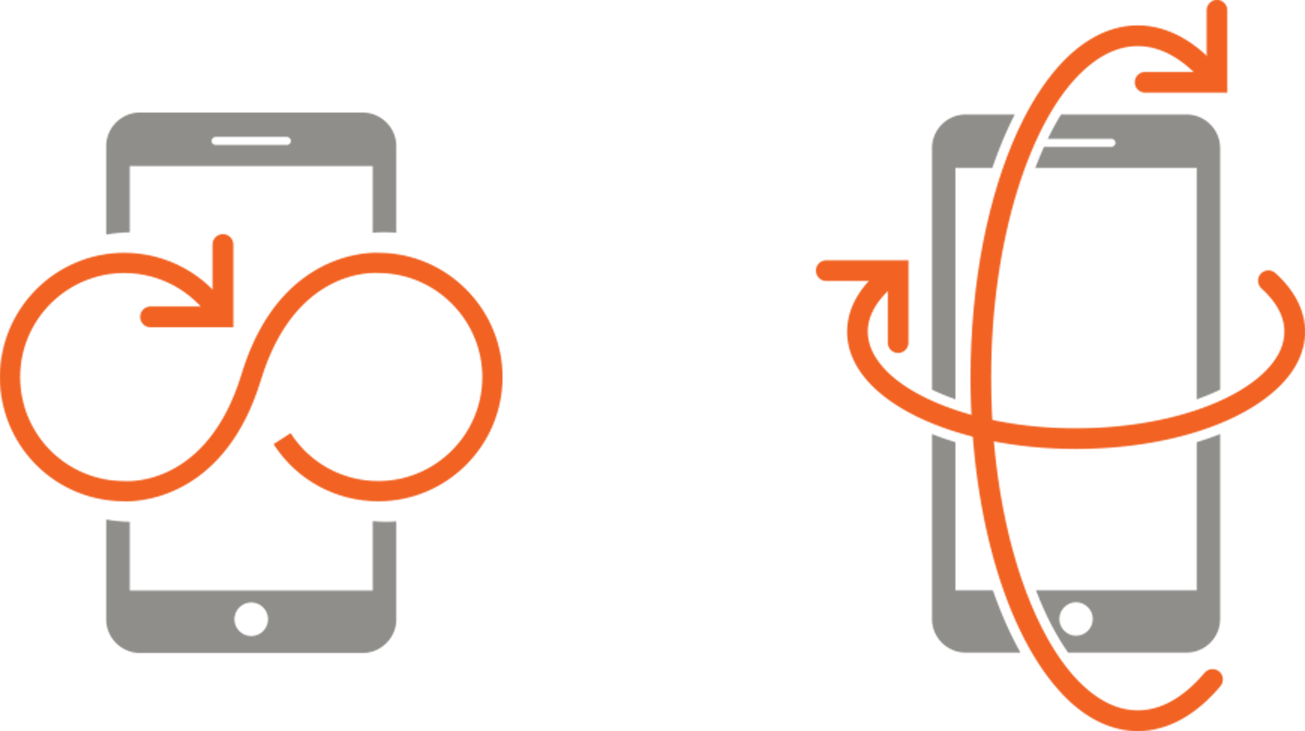
In the event a user is aware of a Calibration session, it is important to let the user understand which motions are necessary to complete the Calibration and to communicate the session progress.
Oriient recommends providing a visual aid of the required motions. The progress may be communicated through sound and haptic feedback.
Warning
Ignoring Calibration requests from the Framework is likely to harm accuracy in positioning.
Implementation
Enabling automatic calibration
Automatic calibration will start calibrating in the background whenever the user is inside a mapped building geofence, and will also trigger the function IPSPositioningObserver.onCalibrationGestureNeeded() whenever calibration is required while already in positioning. If positioning still wasn't requested, this method will not be called and calibration will only be performed in the background.
To enable automatic calibration, simply add the following line anywhere after login:
// Turn on automatic calibration
IPSPositioning.setAutomaticCalibrationEnabled(true)
Once enabled, the SDK starts a calibration session by itself when the device is within approximately 250 meters of an activated building's geofence, and times out after about 10 minutes if calibration isn't completed.
Tip
To maximize the effectiveness of automatic calibration, it is recommended to log in to the IPSFramework and enable automatic calibration as soon as there is an indication of the user planning to visit a supported store. By starting the automatic calibration process early, there is likely to be a longer interval between the onset of calibration and the initiation of positioning. This increased duration improves the chances of completing the calibration process in the background.
Adding an observer
Add an observer to monitor the necessity, progress and errors of a Calibration session. This is the same observer used for positioning (see Monitoring Positioning Session Events). For details, see IPSPositioningObserver.
// The observer will notify the calibration progress and necessity
IPSPositioning.addPositioningObserver(self)
Implementing the calibration related observer methods
extension A: IPSPositioningObserver {
    ...
    // This method will be called every time there is progress in the calibration. percent will move from 0 to 1 accordingly.
    func onCalibrationProgress(_ percent: Float) {

    }

    // This method will be called every time the recommendation to show the calibration UI changes.
    // Show or hide your calibration UI here, or apply your own logic for whether to show it.
    func onCalibrationGestureNeeded(_ needed: Bool) {
        if needed {
            // Present your calibration UI (for example, the calibration dialog from the Oriient sample app)
            IPSCore.registerApplicationEvent(.calibrationDialogPresented)
        } else {
            // Calibration is finished, hide your calibration UI
            IPSCore.registerApplicationEvent(.calibrationDialogHidden)
        }
    }
    ...
}
Important
The callback function onCalibrationGestureNeeded is invoked only when there's a change in the calibration state. As a result, when initiating the positioning session, we recommend manually checking if calibration is required. If necessary, present the UI dialog accordingly. This verification can be conducted by invoking the IPSPositioning.isCalibrationGestureNeeded() function.