Permissions
Required
Needed by every integration.
Overview
Oriient's Positioning and Calibration services require certain user permissions. The SDK does not request these permissions itself — it gives you the flexibility to include the permission requests in your app's own user flow, at whatever point makes sense for your UX.
Location Permission
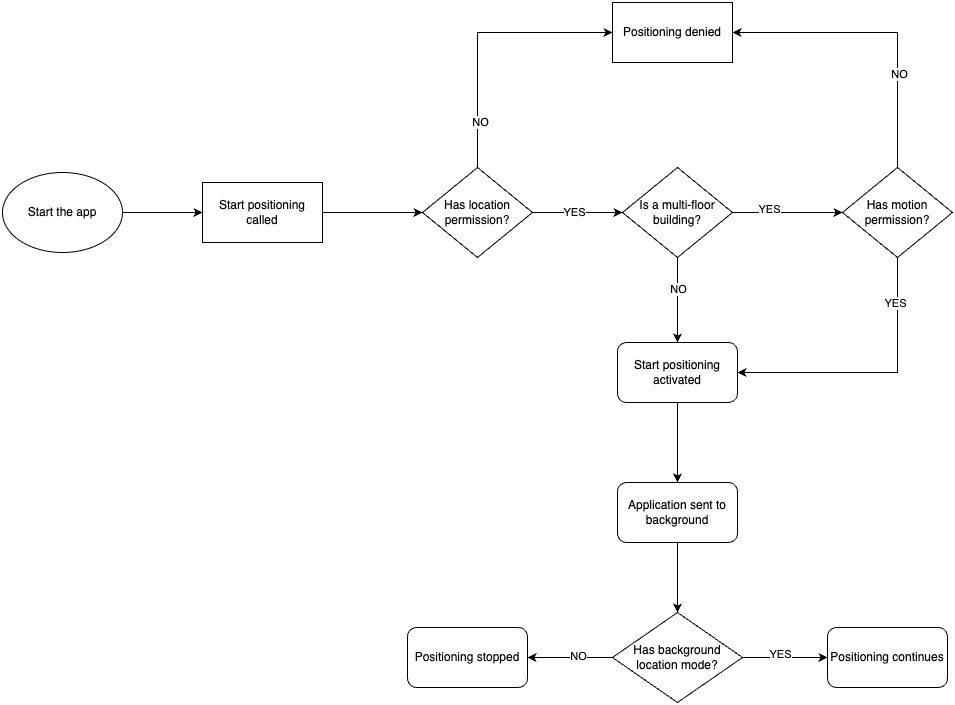
The positioning service requires WhenInUse location permission with full accuracy. If background positioning is required, the Background Location Access capability should also be added to the app (via Xcode's Signing & Capabilities).
Info
If full accuracy access has not been granted, IPSPositioning.startPositioning() can request it automatically using the fullAccuracyPurposeKey parameter — a key in the app's Info.plist NSLocationTemporaryUsageDescriptionDictionary. Without it, and if the user denies the access, startPositioning() fails with the IPSErrorCodes.noFullAccuracyLocationPermission error code.
Motion Permission
Starting with iOS 17.4, multi-floor buildings additionally require Motion permission, since the SDK reads barometric/altitude data to detect floor transitions. Single-floor buildings do not require this permission.
Add an NSMotionUsageDescription key to the app's Info.plist, check the current status with CMAltimeter.authorizationStatus(), and trigger the system permission prompt with a call such as:
CMSensorRecorder().recordAccelerometer(forDuration: 0.5)
Permission Flow