Positioning
Required
Needed by every integration.
Introduction
The primary function of the Oriient Indoor Positioning System (IPS) is to deliver position updates to the end-user. By analyzing sensor readings from the device, IPS calculates the device's position within a building. However, accurate position identification necessitates movement around the map (walk-to-lock).
At the beginning of a positioning session, the system starts determining the device location on the current active map. Initially, with minimal data collected, the system might furnish a position with low accuracy, meaning a high degree of uncertainty. As the device traverses the area, the system gathers more information, fine-tuning the position and enhancing accuracy over time.
Implementation
Positioning Service Availability
The positioning will not start under any of the following circumstances:
- The user is not logged in. See Login guide for more details;
- There is no internet connection and the building's positioning data hasn't been downloaded yet (see Pre-loading the data required for positioning);
- There is no
android.permission.ACCESS_FINE_LOCATIONpermission.
Important
In case the device is missing one of the required sensors: Gyroscope, Accelerometer, Compass. The IPSPositioning.startPositioning() and IPSPositioning.startCalibration() commands will fail with error code IPSErrorCodes.INSUFFICIENT_HARDWARE.
To support floor transitions in multi-floor buildings it is also required the device to have a Pressure sensor.
You can use our endpoint IPSCore.unavailableFeatures() to detect whether the device's sensors aren't sufficient for positioning, or are sufficient for positioning but not for multi-floor positioning. If the returned list is empty, the device is supporting all Oriient's functionality.
Info
A position is not considered reliable by the system until it's locked. See IPSPositioning.isPositionLocked() and IPSPosition.getLockProgress().
Assigning the listener
Use IPSPositioning.addPositioningListener() to add an observer implementing IPSPositioningListener protocol to manage the device's:
- Position updates,
- Current active map changes,
- Calibration requests,
- Calibration progress,
- Positioning and Calibration sessions state changes, and
- Service errors.
IPSPositioning.addPositioningListener(new IPSPositioningListener() {
    @Override
    public void onPositioningEngineStateChanged(int newState) {
        Log.d(TAG, "onPositioningEngineStateChanged() called with: newState = [" + IPSPositioning.describePositioningEngineState(newState) + "]");
    }

    @Override
    public void onPositionUpdate(@NonNull IPSPosition newPosition) {
        Log.d(TAG, "onPositionUpdate() called with: newPosition = [" + newPosition + "]");
    }

    @Override
    public void onCalibrationProgress(float percent) {
        Log.d(TAG, "onCalibrationProgress() called with: percent = [" + percent + "]");
    }

    @Override
    public void onCalibrationGestureNeeded(boolean isNeeded) {
        Log.d(TAG, "onCalibrationGestureNeeded() called with: isNeeded = [" + isNeeded + "]");
    }

    @Override
    public void onFloorChanged(@NonNull IPSFloor ipsFloor) {
        Log.d(TAG, "onFloorChanged() called with: ipsFloor = [" + ipsFloor + "]");
    }

    @Override
    public void onError(@NonNull IPSError error) {
        Log.e(TAG, "onError() called with: error = [" + error.getMessage() + "]");
    }
});
Starting Positioning Session
Recommendation
It is recommended to use the geofence information from buildings' metadata and not start positioning when the device is clearly outside of the building.
Start a positioning session using IPSPositioning.startPositioning().
IPSPositioning.startPositioning(building, null, new IPSCompletionListener() {
    @Override
    public void onCompleted() {
        Log.d(TAG, "Positioning started successfully");
    }

    @Override
    public void onError(@NonNull IPSError error) {
        Log.e(TAG, "Failed to start positioning: error = [" + error.getMessage() + "]");
    }
});
Note
A building object is not required to start positioning. The building ID is enough, IPSPositioning.startPositioning() can be used. In this case, the SDK will get the building information internally.
Providing Starting Position
If your application holds information about the device location the moment a positioning session starts (from another positioning service or some app-specific logic), you can provide that information while starting a positioning session. Doing so helps the system more quickly acquire device position.
Start positioning session using IPSPositioning.startPositioning() with a starting position describing the device location, heading, and the location accuracy.
Warning
Providing incorrect information about the initial device position may significantly increase the time it will take the system to acquire an accurate position.
While the system is not in a positioning state, you can use IPSPositioning.setLastKnownPosition() to set the starting position for the future positioning session. You can also use that information to update the system's Last Known Position.
Monitoring Positioning Session Events
This section will provide further information describing the methods of the IPSPositioningListener which was assigned earlier in this guide.
Manage Device's Position Updates
The void onPositionUpdate(@NonNull IPSPosition newPosition) method will be called with a position update.
Each position update contains:
- Device's location – (x, y, z) vector in meters;
- Device's heading – (x, y) coordinate on a unit circle that denotes heading;
- Accuracy measure – scalar in meters.
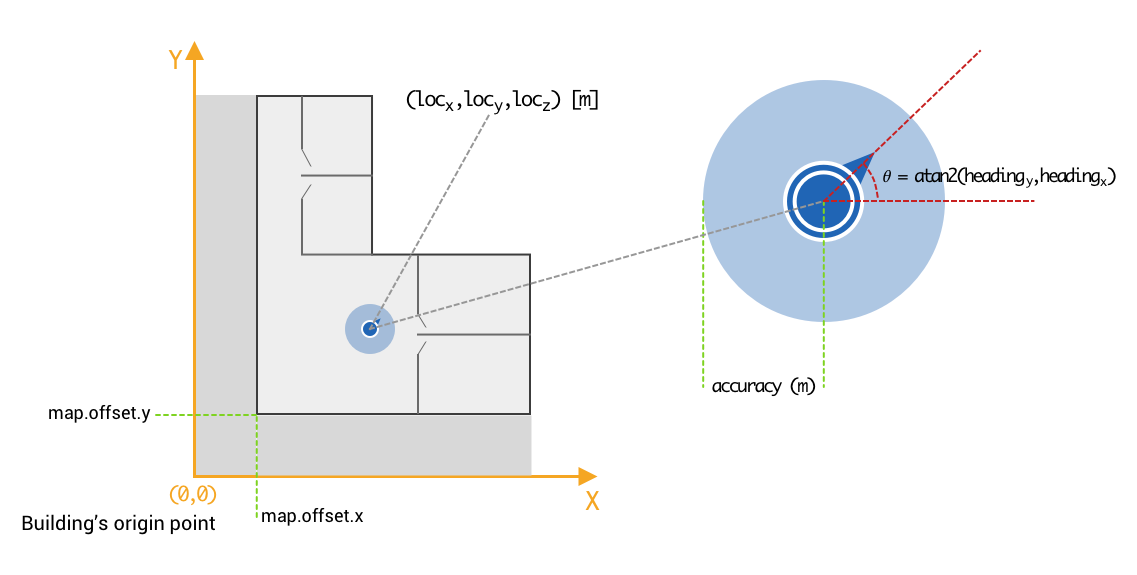
The overview of the Coordinate System used in Oriient IPS can be found here.
//IPSPositioningListener implementation
public void onPositionUpdate(@NonNull IPSPosition newPosition) {
    IPSCoordinate location = newPosition.getLocation();
    float locationAccuracy = newPosition.getLocationAccuracy();
    IPSHeading heading = newPosition.getHeading();
    double headingAngle = Math.atan2(heading.getY(), heading.getX());
    float headingAccuracy = newPosition.getHeadingAccuracy();
    IPSHeading mainOrientation = newPosition.getMainOrientation();
}
Tip
Please mind the difference between headingAngle to mainOrientation. headingAngle is used to indicate the angle of the device itself, while mainOrientation represents the walking direction of the user. In terms of UI development, the headingAngle is used to show a directional cone attached to the user dot, while mainOrientation is used for map rotation based on the user walking direction.
Manage Floor Change
In case the device moves to another floor in the building, the onFloorChanged(@NonNull IPSFloor ipsFloor) method will be called with the new floor object. The positioning session will continue on the new floor. The floor change will also affect the navigation and proximity services and possibly should be presented in the UI.
Manage Calibration Needed Request
In case the system determines it is necessary to calibrate the device's onboard hardware while positioning, the onCalibrationGestureNeeded() method will be called with isNeeded == true. It is strictly recommended that you do not ignore the calibration requests. For information on how to perform a calibration session, see Calibration.
Positioning in the background
An Android app stops receiving sensors data after entering the background. For most use case, it is mandatory to receive sensor data even when the app is sent to the background. Therefore, please add a Foreground Service according to the official documentation.
Tagging important events
It is possible to tag important events during a positioning session (for example - barcode scans) using IPSPositioning.sendEventTag(). Each event tag will be assigned with the most relevant information about the device position for our PLAI service. Use IPSEventTagType.PRODUCT_SCAN for scanned products, or IPSEventTagType.ITEM_NOT_FOUND for items that couldn't be found.
See Product Location (PLAI) for the full flow, including product metadata and high-confidence scans. You may also refer to our full event-tagging guide here.
Stopping Positioning Session
To stop a positioning session, use IPSPositioning.stopPositioning().
IPSPositioning.stopPositioning(new IPSCompletionListener() {
    @Override
    public void onCompleted() {
        Log.d(TAG, "Positioning stopped successfully");
    }

    @Override
    public void onError(@NonNull IPSError error) {
        Log.e(TAG, "Failed to stop positioning: error = [" +error.getMessage() +"]");
    }
});